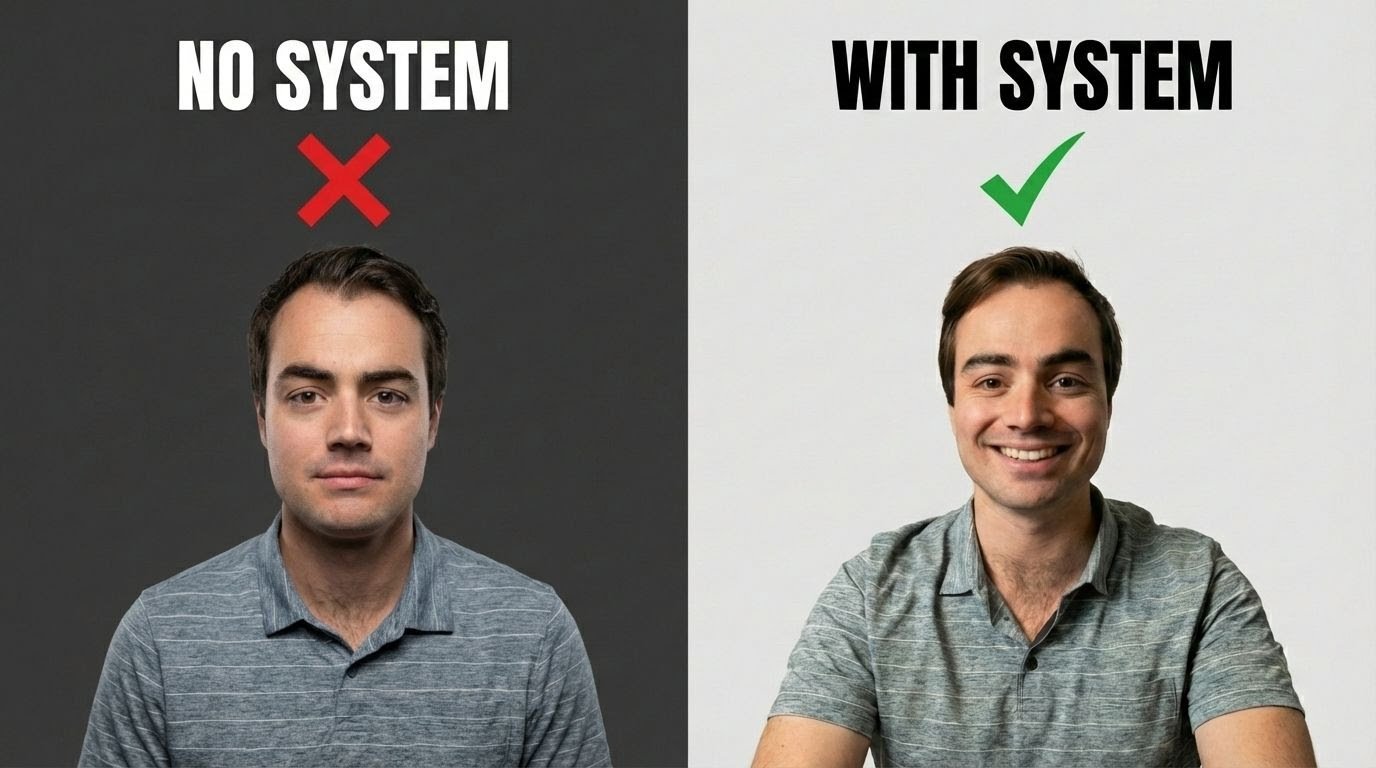
From Selfie to Studio: How to Use Google's Nano Banana Pro to Create Professional AI Headshots (Without the "Uncanny" Effect)
In an era where first impressions are increasingly digital, a professional headshot is no longer a luxury—it's a necessity. Whether for LinkedIn, company websites, or speaker profiles, the right photo conveys credibility, approachability, and competence. Yet, booking a professional photoshoot can be expensive, time-consuming, and intimidating. Enter AI-powered headshot generators: a promising solution that, until now, has often delivered unsettling results. Many AI-generated portraits suffer from the "uncanny valley" effect—slightly off proportions, waxy skin, or unnatural lighting—that undermines rather than enhances your professional image. But what if you could transform a simple selfie into a polished, studio-quality headshot using Google's Nano Banana Pro? This post explains exactly how, and why our prompting system prevents the pitfalls that plague most AI headshot tools.
The "uncanny" quality of many AI headshots stems from a fundamental mismatch: generic models trained on broad datasets don't understand the nuances of professional portraiture. They might over-smooth skin, distort facial structure, or apply lighting that clashes with the subject's features. The result is a photo that looks technically proficient but emotionally hollow. The solution isn't better AI—it's better prompting. By combining strategic photography basics with precise, post-processing instructions in Google AI Studio, you can guide Nano Banana Pro to enhance your image while preserving your authentic appearance. Here's your step-by-step guide to achieving headshots that look professionally crafted, not algorithmically generated.
Step 1: Capture the Right Source Image
AI can work wonders, but it can't fix fundamental photographic flaws. Start by setting up your environment to minimize shadows and distractions. Position yourself facing a window or use a neutral background with direct, soft light—this creates even illumination that's easy for AI to enhance. Next, use your webcam or camera to snap a chest-up picture, maintaining a high lens angle (slightly above eye level). This flattering perspective avoids unflattering distortions and provides the AI with clear facial geometry to work with. Avoid heavy filters or beauty modes; the goal is a clean, high-resolution source image that captures your natural expression.
Step 2: Configure Google AI Studio for Precision Enhancement
Navigate to Google AI Studio and select "playground" to begin a new chat. Ensure your project includes an API key with Nano Banana Pro and Gemini enabled—these tools work in tandem to deliver both image processing and intelligent prompting. Upload your source image, then paste this carefully crafted post-processing prompt: "Generate: Post-processing enhancement, professional color grading, balanced studio lighting, clear and crisp details, preserve original facial structure and clothing, remove noise and grain, sharpen focus, upscale to 8k, refine skin texture, subtle dodging and burning."
This prompt is engineered to avoid common AI pitfalls. Instructions like "preserve original facial structure" prevent over-alteration, while "subtle dodging and burning" mimics professional photo editing techniques that add dimension without looking artificial. By specifying "balanced studio lighting," you guide the AI to apply consistent, flattering illumination rather than dramatic, unrealistic effects.
Step 3: Iterate and Refine for Perfection
AI generation is rarely perfect on the first try. Test your prompt with a variety of source images—different expressions, angles, or lighting conditions—to understand how Nano Banana Pro responds. Once you're satisfied with the outcome, ask the AI to recreate the image in 4K resolution for maximum clarity and versatility across platforms. This iterative approach ensures you don't just get a "good enough" headshot, but one that truly represents your professional brand.
Step 4: Leverage Gemini for Creative Expansion
After mastering the basic enhancement, unlock creative possibilities by engaging Gemini directly. Give it the same request, specifying that you wish to "edit photos," and ask it to "come up with four concepts for headshots using the same principles." Gemini might suggest variations like a minimalist corporate portrait, a dynamic environmental shot, a warm conversational style, or a bold creative direction—all while adhering to your core requirements of natural appearance and professional polish. This step transforms a single headshot into a versatile visual toolkit for different contexts and audiences.
Why This Method Works When Others Fail
The key differentiator is intentionality. Most AI headshot tools apply a one-size-fits-all filter, prioritizing dramatic transformation over authentic enhancement. Our approach treats AI as a collaborative editor, not a replacement for human judgment. By starting with a well-lit, high-quality source image and using precise, constraint-based prompts, you maintain control over the output. The result is a headshot that looks like you—just your most confident, professional self.
This method also addresses ethical considerations. In an age of deepfakes and digital manipulation, preserving facial authenticity isn't just aesthetic—it's a matter of trust. Our prompting system explicitly instructs the AI to "preserve original facial structure," ensuring that your enhanced photo remains a truthful representation. This balance between improvement and integrity is essential for professional use, where misrepresentation can damage credibility.
Beyond Headshots: Scaling Professional Visual Content
While LinkedIn profiles are a common use case, this technique has broader applications. Recruiters can standardize team photos across global offices. Entrepreneurs can generate consistent branding visuals without recurring photoshoot costs. Coaches and consultants can refresh their marketing materials seasonally with minimal effort. By mastering this workflow, you gain a scalable solution for professional imagery that adapts to your evolving needs.
As AI image generation continues to advance, the gap between amateur and professional results will increasingly depend on prompting skill, not just tool access. Google's Nano Banana Pro, combined with Gemini's creative reasoning, represents a powerful combination—but only when guided by human expertise. Our prompting system codifies that expertise, making professional-grade headshots accessible to anyone with a smartphone and an internet connection.
The future of professional photography isn't about replacing photographers; it's about democratizing access to quality visuals while preserving the human elements that build trust. By learning to collaborate with AI through intentional prompting, you unlock a new level of creative control. Your headshot should tell your story—not an algorithm's interpretation of it. With the right approach, your selfie isn't just a casual snapshot; it's the foundation of a compelling professional narrative.
Start experimenting today. Capture your source image, refine your prompts, and discover how AI can elevate your visual presence—without losing the authenticity that makes you, you.
Your one-stop shop for automation insights and news on artificial intelligence is EngineAi.
Did you like this article? Check out more of our knowledgeable resources:
Watch this space for weekly updates on digital transformation, process automation, and machine learning. Let us assist you in bringing the future into your company right now